SPEED
LIMIT
55
15s
Enable Location Access
SpeedMinder requires location access to work. If you accidentally denied permission, follow the steps below for your device.
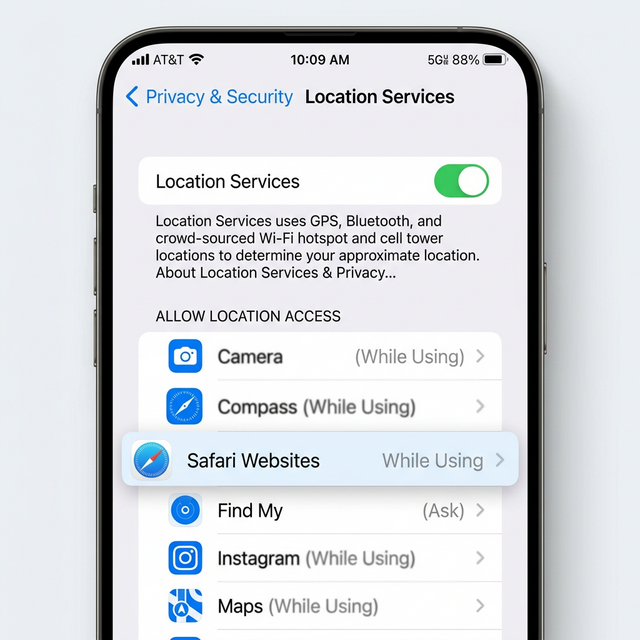
  1. Open Settings on your iPhone
  2. Scroll down and tap Privacy & Security
  3. Tap Location Services
  4. Make sure the toggle is ON (green)
  5. Scroll down and tap Safari Websites
  6. Select While Using the App
iOS Location Settings
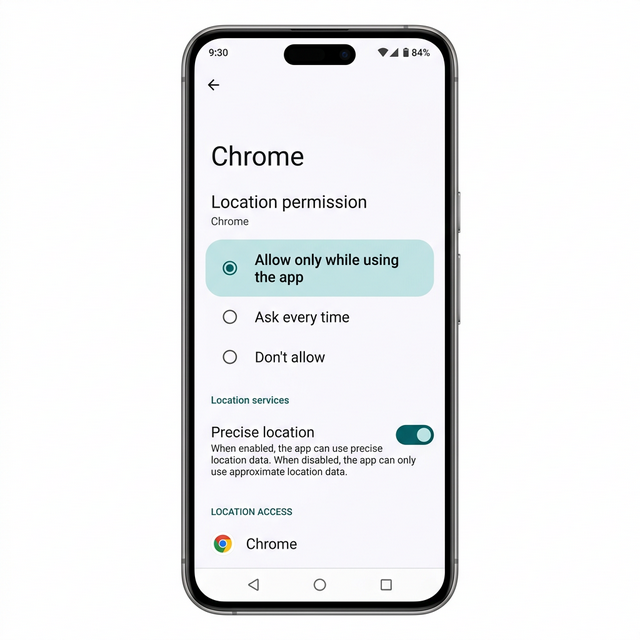
  1. Open Settings on your Android device
  2. Tap Location
  3. Make sure location is turned on
  4. Tap App permissions
  5. Find and tap Chrome (or your browser)
  6. Select Allow only while using the app
Android Location Settings
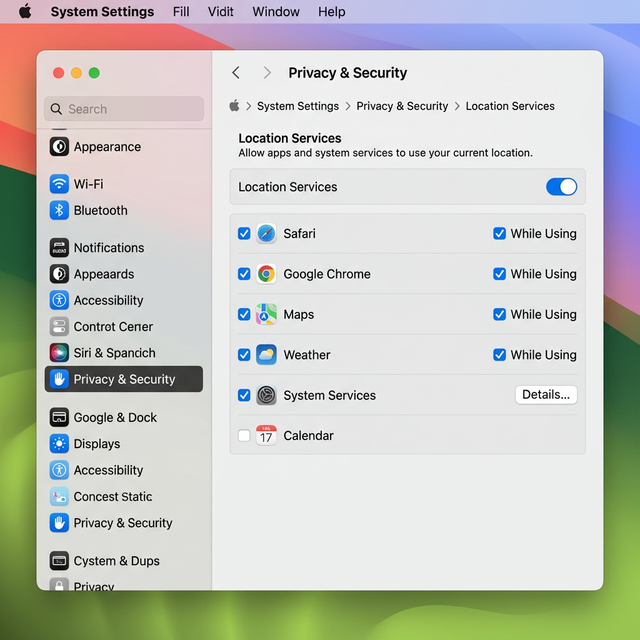
  1. Open System Settings
  2. Click Privacy & Security in the sidebar
  3. Click Location Services
  4. Make sure the toggle is ON
  5. Check the box next to Safari or Google Chrome
  6. Set it to While Using
macOS Location Settings
  1. Open Settings
  2. Click Privacy & security
  3. Click Location
  4. Turn on Location services
  5. Turn on Let apps access your location
  6. Turn on Let desktop apps access your location
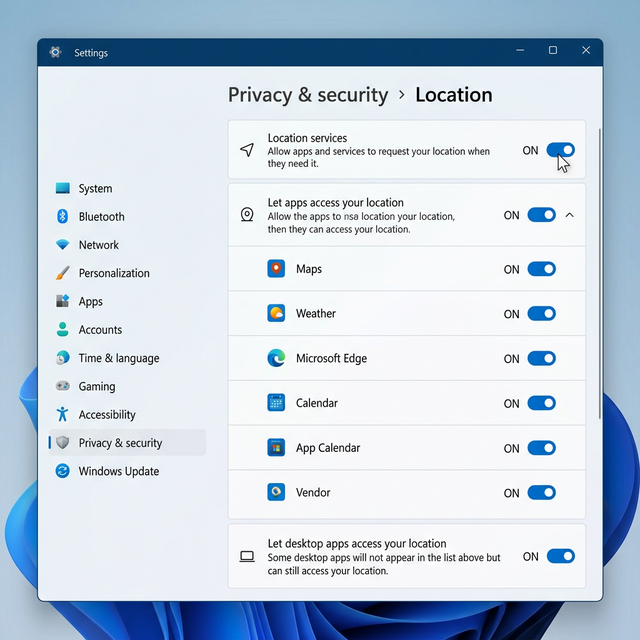
Windows Location Settings
📲
Install SpeedMinder
Add SpeedMinder to your home screen for instant, full-screen access — just like a native app.
    Before You Drive
    Please read and accept the following before using SpeedMinder.

    ⚠️ Disclaimer & Limitation of Liability

    SpeedMinder is provided "as is" for informational purposes only. Speed limit data may be inaccurate, outdated, or incomplete at any time. Always obey posted road signs and follow all applicable traffic laws.

    The developers and operators of SpeedMinder assume no responsibility for any tickets, fines, accidents, injuries, or damages that may result from using this application. You acknowledge that you are solely responsible for your driving decisions.

    Do not rely on this app as your sole source of speed limit information. This app is a supplemental tool only and is not a substitute for attentive driving.

    📡 Data Sources

    Speed limit data is sourced from:

    • OpenStreetMap (OSM) — Community-contributed, open geographic data (© OpenStreetMap contributors)
    • TomTom Routing API — Commercial routing and speed data
    • WZDx — Work Zone Data Exchange feeds from state DOTs for construction zone information

    Data may differ from actual posted speed limits. Coverage varies by region. Updates are processed regularly but not in real-time.

    By clicking "I UNDERSTAND & AGREE", you agree that you have read and understood
    this disclaimer and accept all terms.
    Meet SpeedMinder
    Your calm, intelligent co-pilot.
    Always watching the road ahead.
    Never distracting you from it.
    15-second advance warning
    See the new speed limit coming before you reach it
    Audio-first interface
    Eyes on the road. SpeedMinder speaks — you listen
    Builds as you drive
    Gets smarter and more accurate every trip
    How should SpeedMinder talk to you?
    You can always change this later in settings.
    Co-pilot — Spoken word
    "Speed limit changing to 45 in 12 seconds." Full verbal awareness.
    Subtle — Soft tones
    Musical chimes for limit changes. Nothing spoken. Elegant and unobtrusive.
    Zen — Haptic & Visual only
    Silent. Just vibrations and the on-screen animation. Perfect for music lovers.
    Silent Navigator — Visual only
    Pure visual display. Best with CarPlay or a mounted screen.
    How much should SpeedMinder say?
    More information means more awareness — but also more audio. Your call.
    Quiet
    Only speaks up for speeding alerts and large speed limit changes (±15mph or more).
    Normal — Recommended
    All limit changes, 15-second advance warnings, speeding alerts. Balanced.
    Full Awareness
    All of the above plus school zone alerts, construction zones, and accuracy feedback after each change.
    Permission Needed
    SpeedMinder needs your location to know which roads you're on and how fast you're going. Your location never leaves your device except to look up speed limit data.
    Location — While Using App
    Required for speed limit lookups
    Tap the button above, then tap Allow when your browser asks.

    Location blocked? Tap here for help
    SPEEDMINDER
    READY
    NEXT CHANGE IN
    NEXT LIMIT
    YOUR SPEED
    MPH
    SPEED LIMIT
    CURRENT
    Settings
    Alert Style
    Verbosity
    Speeding Alert
    Alert when over by
    4 MPH
    0 mph (exact) 15 mph
    Persistent speeding beep
    Beep every 2 seconds while over the limit
    Advance Warning
    Warn this many seconds before
    15s
    5s 30s
    Accuracy Feedback
    Tell me how I did
    After each speed limit change, say if you were early, on time, or late
    Units
    Voice Settings
    Speech rate
    How fast SpeedMinder speaks
    Slower Faster
    Appearance
    Light mode
    Switch to a bright interface
    Install
    Add to Home Screen
    Install SpeedMinder as an app on your device
    📲